[VA] How to get your RON/Electronic Endorsement in Virginia
[VA] How to get your RON/Electronic Endorsement in Virginia
Before you can use the Notary Hub platform by Everything Legal, you must be currently commissioned as a traditional notary.
Note: If you do not already have a notary license, you will need to complete that as your first step.
Steps To Become a RON in Virginia
Video Resources
- How to Become a Remote Online Notary in Virginia
Overview of Virginia’s e-notary/RON process and requirements.
Step 1: Sign-up & Create Your Account With NotaryHub.com by Everything Legal
Obtain your Digital Certificate, Electronic Signature, and Digital Stamp from our partners at SSL through our all-in-one platform.
Everything Legal also provides you with the required Electronic Journal for documenting your remote online notarizations.
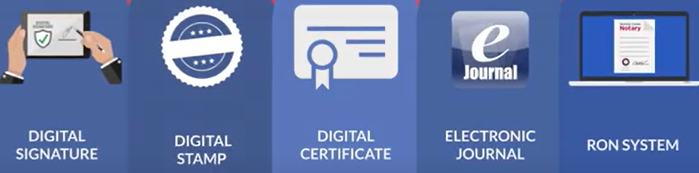
For instructions on how to obtain your digital certificate, refer to the help article here:
[Get Your Digital Certificate](X509 Certificate Setup Guide)
Step 2: Read & Understand The Secretary of the Commonwealth’s Instructions
It is important that you are aware of the following information before submitting your application to become an electronic notary public.
It may be helpful to re-read pages 6–9 of the Virginia Notary Handbook and the Electronic Notarization Assurance Standard, which includes the requirements for an electronic stamp/seal, before proceeding with your application.

Step 3: Gather Required Information To Apply
The Electronic Notary Application requires your notary commission number, a valid email address, and your name exactly as it appears on your current notary commission certificate. If you are unsure of how your commission name reads, email a request to: notary@governor.virginia.gov
Each applicant must submit a registration form that includes:
- The applicant's full legal and official notary names
- A general description of the technology used to create an electronic signature for official acts as an Electronic Notary (NotaryHub.com)
- Certification of compliance to the Secretary of the Commonwealth with electronic notary standards
- A valid email address
Applicants must sign the Electronic Notary Application using their electronic signature created through Notary Hub. Your electronic signature must match the name on your commission, and the application bearing your digital signature must be transmitted electronically to the Virginia Secretary of the Commonwealth.
You will apply your X.509 digital signing certificate to digitally finalize documents requiring notarization.
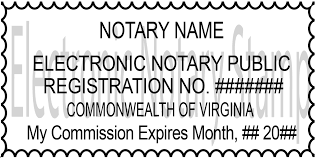
Your official electronic notary seal must consist of an image or text on the electronic document that includes:
- Your name (as shown on your commission)
- Your registration number
- The words “Electronic Notary Public”
- The words “Commonwealth of Virginia”
- Your commission expiration date
Step 4: Complete The Electronic Notary Application
Once you have gathered the necessary data, you will find the application by going to:
https://soc-notary.azurewebsites.net/
The application process is not complete—and will not be reviewed—until your Electronic Notary Application, the signature page including the electronic notary seal, and payment have been received by the Secretary of the Commonwealth's office.
A $45.00 fee must accompany your Electronic Notary Application and is submitted via online payment using Visa, Mastercard, or American Express at the end of the online application.
If your application is approved, you will receive an email confirmation. If it is not approved, you will receive an email notice stating the reasons.